 Privascan
PDF tools that never upload your files
Merge, split, compress, edit, sign, protect — all on your own machine. Nothing is uploaded, because there is nowhere to upload it to.
Need to scan paper, or pull the text out of a photo? The iPhone app does that on the device.
Editor
Add text, white out, highlight, draw, sign and place images.
Merge PDFs
Combine several PDFs into one, in the order you choose.
Organise pages
Reorder, rotate and delete pages, keeping bookmarks intact.
Extract & split
Pull out a page range, or split into one file per page.
Compress
Shrink a heavy PDF by re-rendering its pages as images.
Images → PDF
Turn photos or screenshots into a single PDF.
PDF → images
Export every page as a JPEG or a PNG.
Edit text
Click a line and rewrite it. The original is removed, not covered.
Watermark & numbers
Stamp a watermark across the pages, or number them.
Protect with a password
Encrypt with AES-256, or remove a password you know.
Extract text
Pull the text layer out as a plain .txt file.
Scan documents on your iPhone. Keep them there.
Edges found automatically, free OCR, searchable PDF. Everything runs on the device — there is no Privascan server for a scan to be sent to.
Free. Pro is a one-time $9.99 unlock — no subscription.
Replacing Microsoft Lens? Lens stopped scanning in March 2026, and Microsoft’s own replacement cannot save scans to your device. What to use instead.
- No account
- No Privascan cloud
- No tracking
- No ads
- No watermark
Free, and actually free
Unlimited scans. On-device OCR with searchable PDF export. No watermark on anything, ever.
Nothing to upload to
Scanning, OCR and PDF processing make no network requests and contact no Privascan server — there is none. StoreKit reaches Apple for the purchase only. See how to verify it.
OCR that costs nothing
Every page is read on your iPhone, so your PDFs are searchable and selectable. The app even suggests a file name from the text it finds.
Password-protected PDFs
Encrypt a PDF before you send it. The password never leaves your device — which also means we cannot recover it for you.
One payment, not a subscription
The browser tools above stay free. In the app, $9.99 once unlocks Pro — no renewal, no tier you get downgraded into.
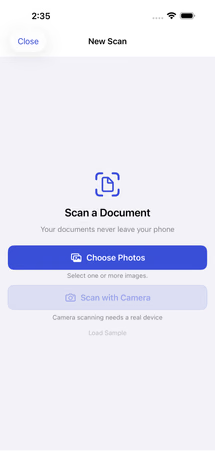 Import a document
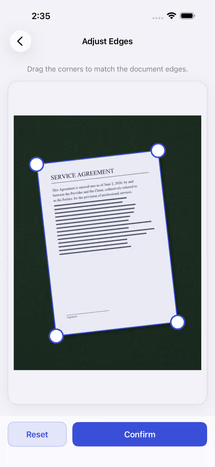 Automatic edge detection
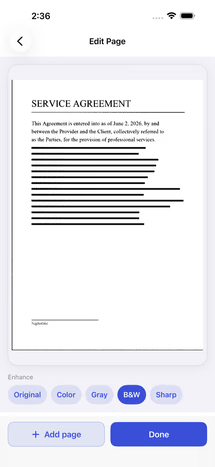 Enhance filters
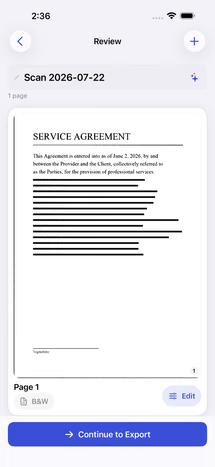 Review before export
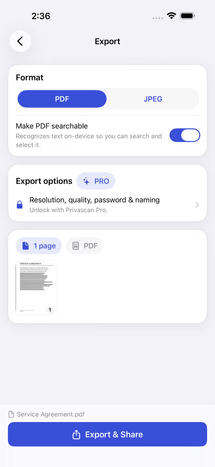 Export options
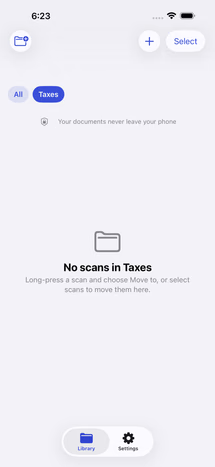 Folders
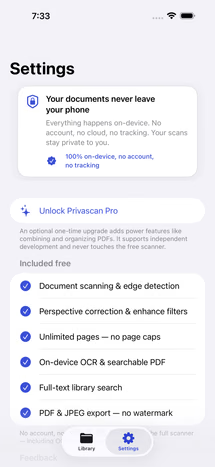 Privacy settings
What Pro adds
The free app is a complete scanner. Pro is for people who work with PDFs all day:
- Assemble PDFs — merge, import, reorder, extract, split and compress
- Password-protect and encrypt exports
- Export presets and file-naming rules
- Folders, with on-device filing suggestions you accept or dismiss
One purchase of $9.99. It unlocks everything above, permanently.