 Privascan
Microsoft Lens alternatives for iPhone, after the shutdown
Lens stopped accepting new scans on 9 March 2026, and the replacement Microsoft recommends will not save a scan to your phone. Below is the honest comparison, including the cases where Privascan is the wrong answer. If you already know what you need:
Free. Pro is a one-time $9.99 unlock — no subscription.
Microsoft Lens is gone. If you are looking for a replacement, the useful question is not “which scanner is best” — it is which one still does the specific thing Lens did for you. For a lot of people that thing was: point, scan, and the file is on my phone.
This page is written by the developer of one of the alternatives, so treat the Privascan parts accordingly. Everything about Microsoft is linked to Microsoft’s own notice, and the sections on where Privascan is a bad fit are not softened.
What happened, with dates
From Microsoft’s retirement notice:
- Retirement began 9 January 2026.
- The app was removed from the app stores on 9 February 2026.
- New scanning stopped on 9 March 2026.
- Microsoft’s recommended replacement is the scanner built into OneDrive.
And the line that sends most people looking for something else:
“OneDrive does not support saving scans locally on your device.”
The thing that actually broke
Lens was a capture tool that happened to sync. OneDrive is a storage product with a capture feature attached. For anything you scan and want to keep on the phone — a passport, a payslip, a lease, a medical form, a receipt you are about to submit — that is a different job.
If you only ever scanned into OneDrive or OneNote, Microsoft’s path is fine and you can stop reading. If you ever scanned something and thought “I would rather this did not go to a cloud account”, you need a different app.
Your realistic options
Apple Notes or Files — free, already installed. iOS scans documents natively: in Notes, tap the camera and choose Scan Documents; in Files, tap the three dots and choose Scan Documents (Apple’s instructions). Edge detection is good, output can be a PDF, and it costs nothing. This is the right answer for plenty of people and it would be dishonest not to lead with it. What it does not give you is a document library with its own search, batch PDF tools, or export presets.
OneDrive. Microsoft’s own recommendation. Sensible if your documents already live in Microsoft 365 and you want them there. It requires a Microsoft account and, per the quote above, will not put the scan on your device.
A third-party scanner app. This is where most Lens users end up. The category is crowded, and the two things worth checking before you install anything are: does the free tier put a watermark on your pages, and is the useful part behind a subscription. Both are common, and neither is obvious until you have already scanned something.
Privascan — the app this site is about. Free, on-device, no account, no watermark, with an optional one-time unlock for the PDF tools.
How to choose, concretely
Five questions that actually separate these apps:
- Where does the file end up by default? On the device, or in someone’s cloud. This is the Lens question.
- Does OCR cost extra? Searchable PDFs are the difference between an archive and a pile of pictures. Several apps charge for it.
- Is the free tier watermarked? Check before you scan something you need to send.
- Subscription or one payment? For a utility you use a few times a month, a recurring charge is hard to justify.
- Does it work with no signal? On a plane, in a basement, at a notary’s office with bad reception.
What happens to your old Lens scans
If you still have Lens installed, open it and export anything you care about before deleting it. Lens kept a gallery inside the app, and once the app is gone from your phone you cannot reinstall it — it was pulled from the App Store in February 2026. Microsoft’s notice does not address what happens to scans held locally, so do not assume they are safe somewhere else.
Anything Lens already sent elsewhere is unaffected:
- Sent to OneDrive or OneNote — still in your Microsoft account. Download from OneDrive, then import into whatever you switch to.
- Saved to your photo library — still in Photos. Any scanner that imports from the photo library, Privascan included, picks them straight up.
- Exported as PDFs — wherever you saved them, usually Files.
How Privascan compares
| Criterion | Microsoft Lens (retired) | OneDrive scanner | Privascan |
|---|---|---|---|
| Still accepts new scans | No, since 9 March 2026 | Yes | Yes |
| Saves scans on the device | Yes | No | Yes — that is the default |
| Requires an account | No | Yes, a Microsoft account | No |
| Works with no network at all | — | — | Yes, airplane mode included |
| Free OCR / searchable PDF | Yes | — | Yes, on-device |
| Watermark on the free tier | No | No | No |
| Android | Yes | Yes | No — iPhone only |
The Microsoft rows come from the retirement notice linked above; the OneDrive column is left blank where Microsoft does not document the behaviour, rather than filled in with a guess. Checked 26 July 2026.
What Privascan actually does
Free, with no limits and no watermark:
- Automatic edge detection and perspective correction
- On-device OCR, so exported PDFs are searchable and the text is selectable
- A suggested file name, read from the page itself
- Colour, grey, black-and-white and sharpen modes
- Export to PDF or image through the normal share sheet
The one-time Pro unlock adds the PDF toolkit: merge, import, reorder, extract, split and compress; password-protected exports; export presets and file-naming rules; and folders.
None of it needs a network. Scanning, OCR and PDF processing make no network requests, and there is no Privascan server for a document to be sent to — you can verify that by using the whole app in airplane mode, which is described on how it works.
Where Privascan is the wrong choice
- You are on Android. Privascan is iPhone-only. The Lens shutdown hit Android users too, and this does not help them.
- You need the OneNote pipeline. Lens dropped scans straight into OneNote sections. Privascan exports through the standard share sheet — you can send a PDF to OneNote, but that is a share, not an integration.
- You want scans synced across your devices automatically. There is no cloud, so there is nothing to sync. That is the trade being made, not an oversight.
- Apple Notes already covers you. If you scan twice a year and never search your scans, the built-in tool is free and fine.
Where it fits
- You scanned sensitive documents with Lens and want them to stay on the phone.
- You want searchable PDFs without paying a subscription for OCR.
- You are done with apps that watermark the free tier.
- You want a sensible file name without typing one.
Written by the developer of Privascan, 26 July 2026. Sources: Microsoft's Lens retirement notice, Apple's document-scanning instructions. Microsoft, Microsoft Lens, Office Lens, OneDrive and OneNote are trademarks of Microsoft Corporation. Privascan is an independent app and is not affiliated with, sponsored by, or endorsed by Microsoft or Apple.
Free. Pro is a one-time $9.99 unlock — no subscription.
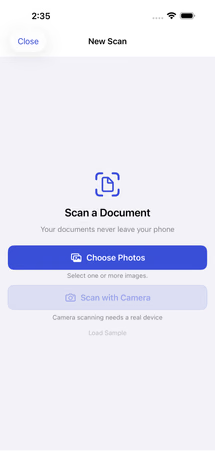 Import a document
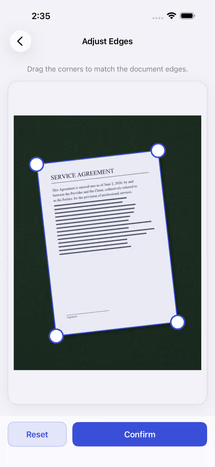 Automatic edge detection
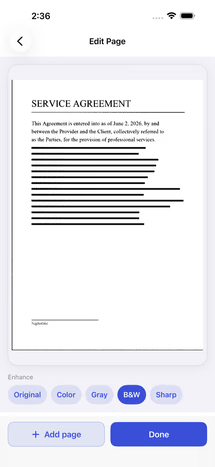 Enhance filters
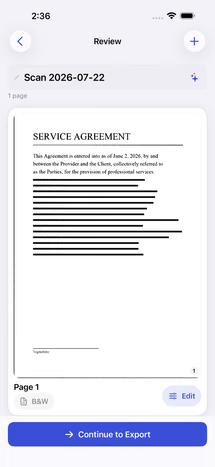 Review before export
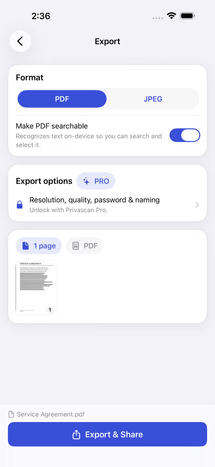 Export options
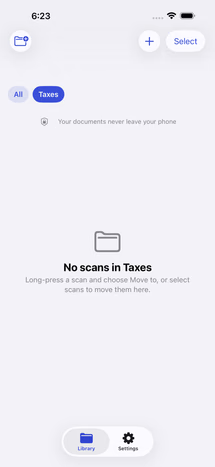 Folders
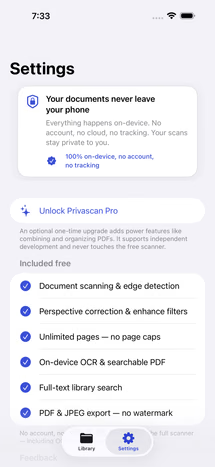 Privacy settings